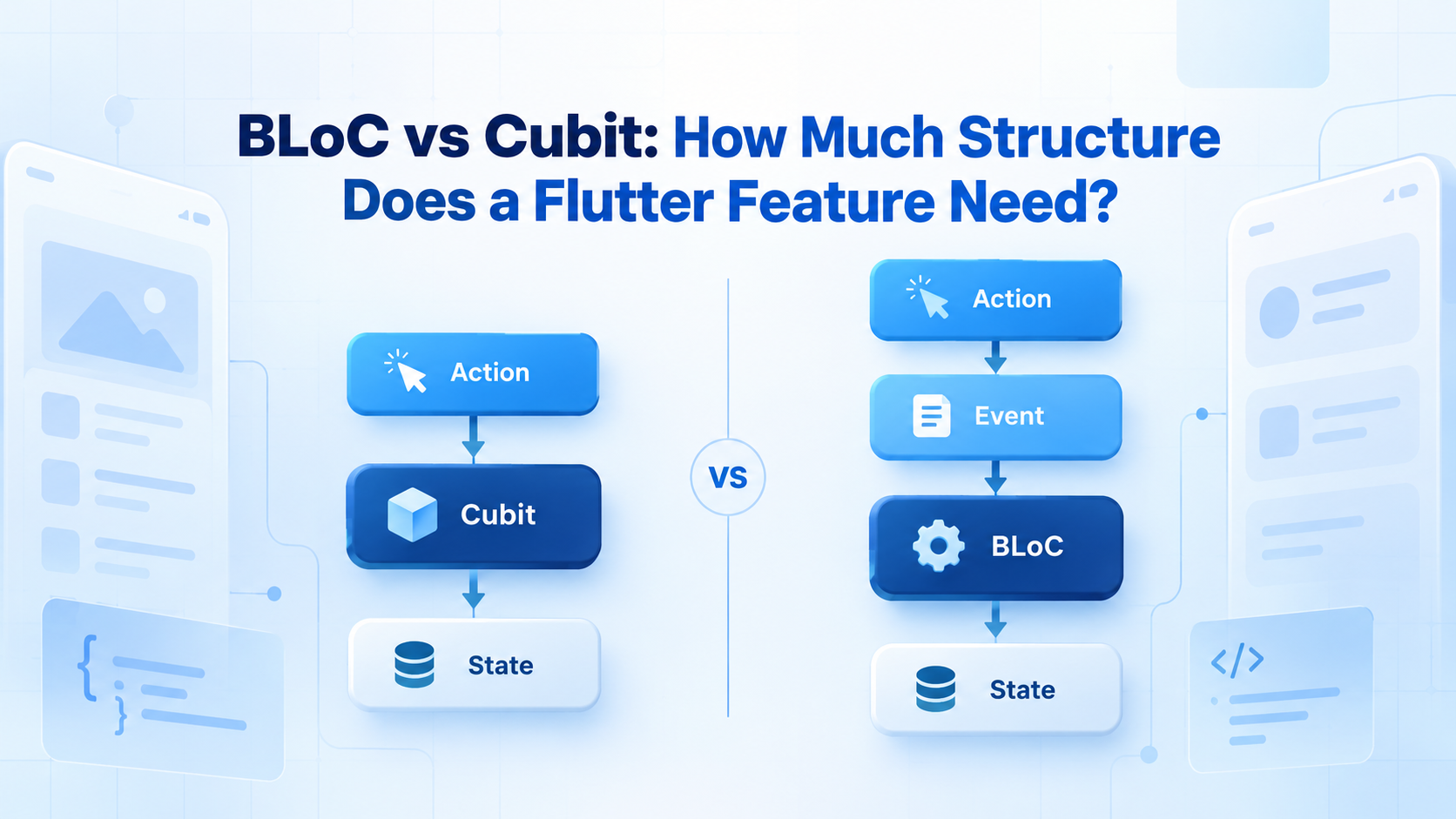
Choosing between BLoC and Cubit is not really about deciding which state-management tool is better. Both belong to the same bloc ecosystem, separate business logic from the interface, and expose state as a stream.
The practical question is simpler:
Does the feature benefit from an explicit event layer, or would that layer merely add files and terminology?
The answer depends on the feature’s behavior not the size of the application.
BLoC and Cubit Share the Same Foundation
Cubit and BLoC both extend BlocBase. They can:
- Hold a current state
- Emit new states
- Notify Flutter widgets about state changes
- Report changes and errors through
BlocObserver - Work with
BlocBuilder,BlocListener, and otherflutter_blocwidgets - Be tested independently of the UI
The difference is how changes enter the state manager.
A Cubit exposes methods:
class CartCubit extends Cubit<CartState> {
  CartCubit(this.repository) : super(const CartState());

  final CartRepository repository;

  Future<void> addProduct(Product product) async {
    emit(state.copyWith(isUpdating: true));

    final cart = await repository.addProduct(product);

    emit(state.copyWith(
      cart: cart,
      isUpdating: false,
    ));
  }
}
A BLoC accepts events and processes them through registered handlers:
sealed class CartEvent {}

final class ProductAdded extends CartEvent {
  ProductAdded(this.product);

  final Product product;
}

class CartBloc extends Bloc<CartEvent, CartState> {
  CartBloc(this.repository) : super(const CartState()) {
    on<ProductAdded>(_onProductAdded);
  }

  final CartRepository repository;

  Future<void> _onProductAdded(
    ProductAdded event,
    Emitter<CartState> emit,
  ) async {
    emit(state.copyWith(isUpdating: true));

    final cart = await repository.addProduct(event.product);

    emit(state.copyWith(
      cart: cart,
      isUpdating: false,
    ));
  }
}
In both examples, the resulting states may be identical. BLoC simply records the input as an event before running the state transition.
According to the official Bloc concepts documentation, Cubit uses callable functions to trigger state changes, while BLoC converts incoming events into outgoing states.
BLoC vs Cubit at a Glance
| Consideration | Cubit | BLoC |
|---|---|---|
| Input | Public method | Event object |
| Typical flow | Action → method → state | Action → event → handler → state |
| Boilerplate | Lower | Higher |
| Traceability | State changes | Events, transitions and states |
| Event concurrency | Must be managed manually | Supports event transformers |
| Best fit | Direct, predictable features | Event-heavy or concurrent workflows |
| Learning curve | Gentler | Steeper |
| Refactoring overhead | Lower initially | More structure from the beginning |
The additional BLoC structure is valuable only when it communicates or controls something important.
When Cubit Is Enough
Cubit is usually the better starting point when a feature has a small public API and a straightforward sequence of operations.
Common examples include:
- Theme or language selection
- Form state
- Filters and sorting
- Profile editing
- Simple CRUD screens
- Expanding and collapsing interface sections
- Loading a resource with retry support
A login feature, for example, might expose emailChanged, passwordChanged, and submitted. These method names already explain the user’s intent. Wrapping each call in a separate event class may provide little additional value.
Cubit also works well for local feature state. Flutter distinguishes between short-lived ephemeral state, such as a selected tab, and app state, such as authenticated user data or a shopping cart. Not every piece of ephemeral state requires a dedicated state-management object; Flutter’s own State and setState may be sufficient.
A useful rule is:
Use local widget state for isolated presentation details, Cubit for coordinated feature state, and BLoC when the events themselves matter.
Cubit’s smaller API can make a feature easier to read. A developer can open one class and immediately see which operations the UI is allowed to perform.
When BLoC Earns Its Extra Structure
BLoC becomes useful when a feature is better described as a stream of events than a collection of method calls.
Consider a search screen receiving:
- Query-change events
- Filter changes
- Pagination requests
- Refresh actions
- Retry actions
- Connectivity updates
- Several events may arrive close together. A new query should often cancel or supersede the previous request, while pagination requests may need to be processed sequentially or ignored while another page is loading.
This is where explicit events help. The event layer creates a place to express what happened and how competing inputs should be handled.
BLoC is particularly appropriate when:
1. Event order changes the outcome
Payments, authentication, uploads and checkout flows often depend on strict sequencing. An event model makes that sequence visible.
2. Multiple sources trigger the same feature
Events may come from user input, push notifications, WebSockets, background services or lifecycle changes. BLoC gives those inputs a consistent vocabulary.
3. Concurrency needs explicit rules
The bloc_concurrency package provides event transformers for concurrent, sequential, droppable and restartable processing. These policies are useful for rapid searches, repeated button presses and queued operations.
4. Debugging requires the original trigger
Cubit exposes changes containing the current and next state. BLoC additionally exposes transitions containing the event responsible for the change. The official documentation identifies this event visibility as one of BLoC’s main advantages.
5. The workflow is likely to grow
A small checkout may begin with placeOrder(), but later acquire validation, fraud checks, payment authentication, retries and analytics. Modeling these actions as events can keep the workflow understandable as requirements expand.
Model State Before Choosing a Tool
Many Flutter state-management problems are actually state-modeling problems.
A feature represented by several unrelated booleans can enter impossible combinations:
bool isLoading;
bool hasError;
bool isComplete;
What should the UI do if all three become true?
A sealed state hierarchy makes the valid conditions explicit:
sealed class CheckoutState {
  const CheckoutState();
}

final class CheckoutInitial extends CheckoutState {
  const CheckoutInitial();
}

final class CheckoutSubmitting extends CheckoutState {
  const CheckoutSubmitting();
}

final class CheckoutSuccess extends CheckoutState {
  const CheckoutSuccess(this.orderId);

  final String orderId;
}

final class CheckoutFailure extends CheckoutState {
  const CheckoutFailure(this.message);

  final String message;
}
Dart’s sealed modifier restricts direct subtypes to the same library and enables exhaustive switching over known variants. This lets the compiler identify missing cases in suitable switch expressions. See Dart’s class modifier documentation for the language rules.
This modeling approach benefits both Cubit and BLoC. Switching to BLoC will not repair ambiguous or mutable state.
Keep the Architecture Boundary Clear
Neither Cubit nor BLoC should become a container for the entire application.
A maintainable feature usually follows this direction:
Widget → Cubit or BLoC → Repository or use case → Data source
The presentation layer communicates intent. The state manager coordinates the feature. Repositories and use cases handle business rules, caching and external data access.
Avoid placing the following inside a Cubit or BLoC:
- Widgets or
BuildContext - Route-specific UI logic
- HTTP implementation details
- Database queries
- Large domain algorithms
- Formatting that exists only for one widget
Keeping these boundaries narrow makes state logic easier to test and prevents a feature-level state manager from becoming a “god object.”
Testing Cubit and BLoC
Both approaches support deterministic state tests. The official bloc_test utilities can create a Cubit or BLoC, perform actions, and verify the emitted state sequence.
Cubit tests typically call methods directly:
blocTest<CartCubit, CartState>(
  'adds a product to the cart',
  build: () => CartCubit(repository),
  act: (cubit) => cubit.addProduct(product),
  expect: () => [
    isA<CartState>().having((s) => s.isUpdating, 'loading', true),
    isA<CartState>().having((s) => s.cart.items.length, 'items', 1),
  ],
);
BLoC tests add events:
blocTest<CartBloc, CartState>(
  'handles ProductAdded',
  build: () => CartBloc(repository),
  act: (bloc) => bloc.add(ProductAdded(product)),
  expect: () => [
    isA<CartState>().having((s) => s.isUpdating, 'loading', true),
    isA<CartState>().having((s) => s.cart.items.length, 'items', 1),
  ],
);
BLoC’s event layer can improve scenario readability when several actions interact. For a direct feature with only a few commands, Cubit tests are usually more concise.
A Practical Decision Checklist
Choose Cubit when:
- The feature has a few clear operations.
- Actions map directly to state updates.
- Input ordering is not complicated.
- State changes do not require a detailed event trail.
- The event classes would mostly repeat method names.
Choose BLoC when:
- The same feature receives inputs from several sources.
- Event order, cancellation or concurrency matters.
- The cause of every transition should be observable.
- The feature represents a multi-step workflow.
- A shared event vocabulary improves team communication.
Do not base the decision only on team size or project size. A large Flutter application can use many focused Cubits successfully, while one complex feature in a small application may justify BLoC.
Can a Flutter App Use Both?
Yes and many production applications should.
- A practical architecture might use:
- Cubit for settings, forms and filters
- BLoC for authentication, real-time search and checkout
- Local widget state for animations and temporary selections
Consistency matters, but consistency does not require using the same abstraction for every problem. Teams can instead standardize folder structure, state conventions, dependency boundaries and testing practices.
Final Takeaway
Cubit should generally be the default when a Flutter feature has direct actions and predictable state transitions. Its smaller surface area keeps the implementation readable without giving up reactive state, observability or testability.
Move to BLoC when events add meaningful information especially when inputs compete, order matters, several systems trigger the feature, or the team needs to understand exactly why a state changed.
The best Flutter architecture is not the one with the most structure. It is the one with enough structure to make the feature’s behavior obvious.