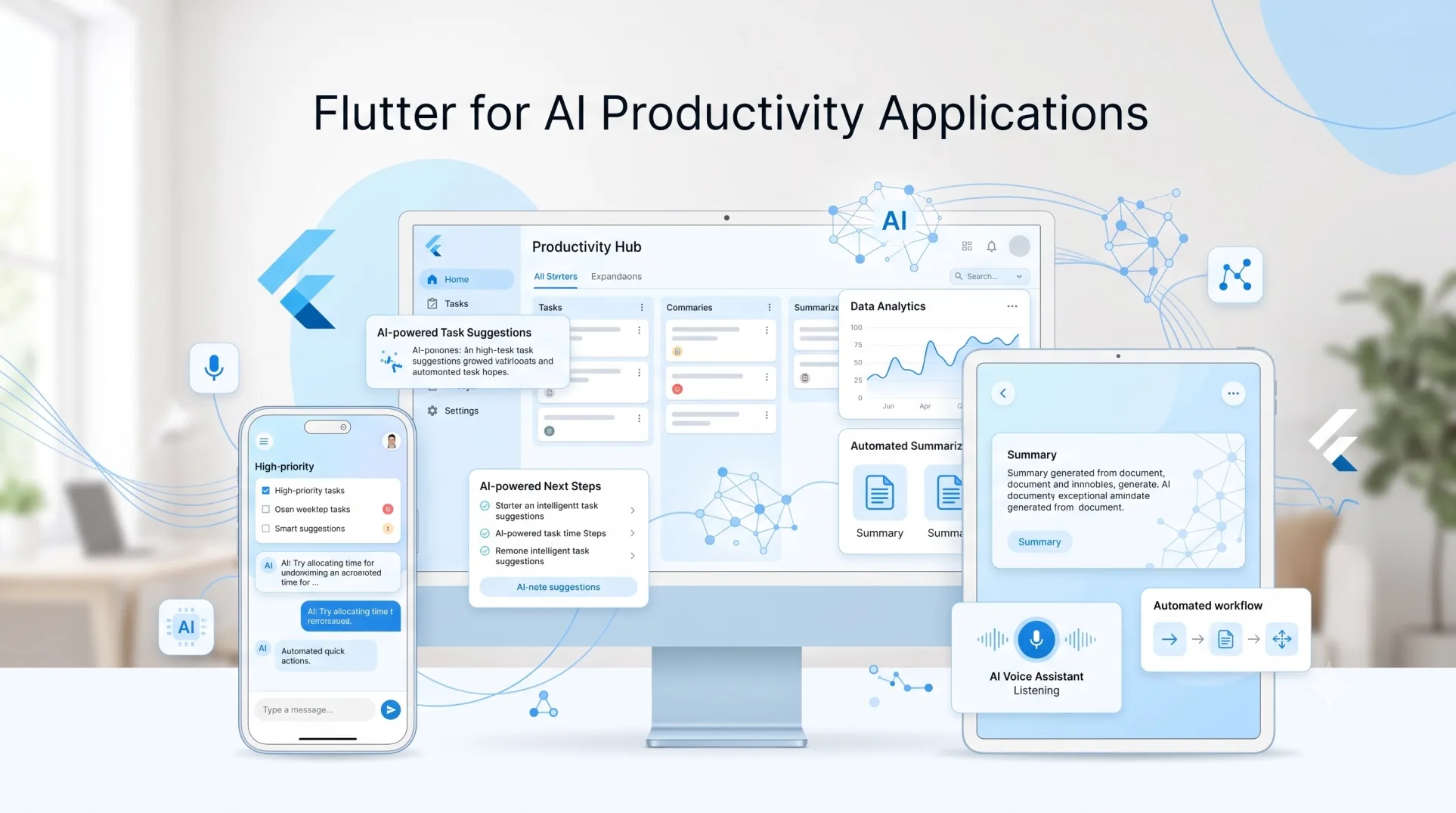
AI productivity applications are moving beyond simple chat interfaces.
The more useful products now summarize documents, organize work, understand images and audio, search internal knowledge, trigger actions, generate structured information, and help users complete workflows instead of merely answering questions.
That change creates an interesting question for application teams:
Where does Flutter fit into AI productivity app development?
A few years ago, the answer was mostly about Flutter providing the frontend while an AI API handled intelligence somewhere else.
That description is becoming outdated.
In 2026, Flutter has a dedicated AI Toolkit, direct integration paths through Firebase AI Logic, support for function calling, multimodal interactions, streaming conversations, and an experimental GenUI SDK for rendering interfaces based on AI interactions. Flutter’s official documentation now has an entire AI section covering both building AI-powered applications and using agents during Flutter development.
This does not mean Flutter should suddenly become the default framework for every AI product.
But for productivity applications that need to work across mobile, desktop, and web while combining AI with a highly interactive interface, Flutter has become much more interesting.
What Is an AI Productivity Application?
An AI productivity app uses AI to reduce the amount of manual work required to complete a task.
That definition is deliberately broader than “AI chatbot.”
Examples include:
- a meeting application that converts conversations into decisions and tasks
- an AI project workspace that summarizes documents and identifies blockers
- a sales application that prepares account briefs before meetings
- a personal productivity assistant that turns messages into reminders
- a document application that extracts structured information from PDFs
- a field productivity tool that understands photos, notes, and voice input
- an internal enterprise assistant that searches company knowledge and performs approved actions
The distinction matters because these applications require far more than a text box connected to an LLM.
They need state management, permissions, structured data, responsive interfaces, integrations, local storage, background operations, and often several different input types.
Those requirements are much closer to Flutter’s strengths.
Why Flutter Fits AI Productivity Apps Better Than Simple AI Chatbots
Flutter’s biggest advantage in this category is not AI itself.
It is the application layer surrounding the AI.
Flutter is designed to reuse application code across Android, iOS, web, and desktop while still interacting with underlying platform services. Its release applications compile for their respective targets rather than relying on Flutter solely as a browser abstraction.
For productivity software, that can matter significantly.
A typical productivity product may start as a mobile application but later require:
- a desktop workspace for employees
- a tablet interface for field teams
- a web version for occasional users
- mobile notifications
- camera and microphone access
- file uploads
- drag-and-drop interactions
- responsive dashboards
Building and maintaining four separate clients can quickly become expensive.
Flutter gives the product team a shared UI and application layer while still allowing platform-specific implementation where necessary.
AI simply increases the value of that shared layer because AI products tend to evolve quickly.
Flutter Now Has an Actual AI Application Stack
The strongest argument for Flutter AI app development in 2026 is that developers no longer have to assemble every AI interaction from scratch.
Flutter AI Toolkit
Flutter’s AI Toolkit provides reusable chat-related widgets and an abstract LLM provider layer.
It supports:
- multi-turn conversations
- streaming responses
- rich text
- voice input
- multimedia attachments
- function calling
- conversation persistence
- custom response widgets
- custom styling
- pluggable LLM providers
Out of the box, the toolkit integrates with Firebase AI Logic. Developers can also implement another provider behind its abstraction.
That makes the toolkit useful beyond basic chatbot development.
Consider an AI project-management assistant.
The model could receive:
“Move the onboarding redesign to next Friday and tell me whether it conflicts with anything.”
The application does not need to respond with instructions telling the user how to update the task.
Through function calling, the model can request an application function that checks the project schedule, returns conflicts, and then asks the user to approve the change. Flutter’s AI Toolkit supports this tool-calling pattern.
That is much closer to a productivity application than a chatbot.
Firebase AI Logic Makes Multimodal Flutter Apps Easier
Firebase AI Logic provides a Dart SDK for Flutter applications to interact with Gemini models.
Its supported capabilities include natural-language and multimodal input, structured responses, multi-turn interactions, function calling, streaming, and other generative AI functionality. Multimodal prompts can include formats such as text, images, PDFs, audio, and video depending on the model and capability being used.
For productivity applications, multimodality is particularly valuable.
A user should not always have to type a carefully constructed prompt.
A Flutter productivity app could let somebody:
- photograph a whiteboard,
- upload meeting notes,
- add a voice explanation,
- ask AI to identify decisions,
- convert those decisions into structured tasks,
- review them,
- push approved tasks into the application’s workflow.
Flutter manages the interaction layer.
The model handles interpretation.
Application services handle the actual business actions.
That separation is important.
The Architecture of a Production Flutter AI Productivity App
The wrong architecture is:
Flutter UI -> LLM -> display whatever comes back
That works for demonstrations.
It becomes dangerous when AI starts modifying customer data or performing business actions.
A stronger architecture separates responsibilities.
1. Presentation Layer
Flutter manages:
- views
- input states
- streamed AI responses
- task previews
- confirmation screens
- loading and failure states
- responsive layouts
- accessibility
The Flutter team’s current architectural guidance recommends separating the UI and data layers and commonly organizing applications around views, view models, repositories, and services.
This pattern maps naturally to AI applications.
The view should not know how model requests, retrieval, or external tools work.
2. AI Orchestration Layer
This layer decides:
- which model receives the request
- which system instructions apply
- which context should be supplied
- whether a tool can be called
- what output format is required
- when a request should be rejected
- whether another model should handle the task
Do not bury this logic inside Flutter widgets.
Treat AI orchestration as application logic.
3. Context and Retrieval Layer
Most valuable productivity apps depend on information that the base model does not know.
That might include:
- company documentation
- user projects
- CRM records
- previous conversations
- calendars
- task databases
- customer history
A productivity assistant becomes useful when it understands the user’s working context rather than simply having access to a powerful general model.
4. Action Layer
This is where an assistant becomes an agent.
Functions might include:
createTask()
rescheduleMeeting()
searchCustomer()
updateCRMRecord()
generateReport()
sendForApproval()
The model should select or request an action.
The application should control whether that action can actually execute.
AI Productivity UX Should Not Look Like ChatGPT Everywhere
One of the biggest product mistakes in AI development is assuming every AI experience needs to become a conversation.
Sometimes chat is appropriate.
Often it is not.
Imagine an employee asking:
“Plan my next week around these six priorities.”
A wall of generated text is not the best productivity interface.
The better response could be:
- a calendar
- draggable task blocks
- conflict indicators
- priority controls
- an approval button
This is where Flutter’s experimental GenUI SDK becomes particularly interesting.
GenUI allows an AI agent to compose interfaces using an application’s approved catalog of Flutter widgets. Instead of generating arbitrary frontend code, the agent describes a UI using predefined schemas, and Flutter renders those existing widgets.
For example, an AI travel-planning assistant might generate date pickers, sliders, selections, and cards instead of returning everything as prose.
For a productivity app, the same pattern could produce interactive:
- task lists
- timelines
- approval forms
- dashboards
- comparison cards
- schedules
There is an important caveat: Flutter currently labels the GenUI package as alpha, so it should be treated as experimental rather than assumed to be production-stable.
Still, the direction is significant.
The future of AI productivity interfaces may be less about chatting with software and more about AI dynamically selecting the right interface for the job.
The Most Important AI Feature Is Often Function Calling
Generative text attracts attention, but function calling creates much of the practical productivity value.
Suppose a user tells an AI sales assistant:
“Find every enterprise lead that has not received a follow-up in the last seven days.”
Text generation cannot solve this reliably by itself.
The model needs access to a controlled function that queries the CRM.
Then the user might say:
“Draft follow-ups for the top five.”
Generation becomes useful.
Finally:
“Schedule them for tomorrow morning.”
Now another function is required.
A well-designed Flutter app can present all three stages through the same experience while the AI switches between reasoning, generation, retrieval, and tool execution.
This is what separates an AI feature from a real AI workflow.
Streaming Matters More Than Developers Think
AI applications introduce a UX problem traditional CRUD applications rarely face: users may wait several seconds for an answer.
Showing a spinner until an entire response arrives makes the product feel slower than it actually is.
Streaming lets the interface render results as they are generated.
Both the Flutter AI Toolkit and Firebase AI Logic support streamed responses.
For productivity software, streaming can improve perceived responsiveness for:
- document summaries
- research
- long-form writing
- planning
- code explanations
- data interpretation
- But developers should not stream everything blindly.
Structured data that drives application state should usually be validated before the interface treats it as final.
Build Guardrails Into the Flutter Interface
AI models can generate plausible but incorrect output.
Flutter’s own AI best-practices documentation explicitly recommends designing applications so users can verify and correct AI-generated information.
This is particularly important for productivity software.
If AI extracts five tasks from a meeting, the application should not necessarily create all five automatically.
A safer workflow is:
AI proposes -> Flutter displays -> user verifies -> system executes
For low-risk operations, that loop can become more automated.
For higher-risk actions such as:
- sending messages
- deleting information
- submitting financial data
- changing customer records
- publishing content
human confirmation should remain visible.
Flutter is useful here because deterministic UI can surround probabilistic AI.
The model generates possibilities.
The application enforces rules.
Security Cannot Be an Afterthought
AI productivity applications frequently handle sensitive organizational information.
Developers therefore need to think beyond hiding an API key.
Firebase AI Logic uses a proxy architecture that can work with Firebase App Check so requests can be verified as originating from legitimate applications. Google also recommends protecting AI endpoints and backend resources against unauthorized clients.
As of September 2026, Firebase states that App Check enforcement for Firebase AI Logic will become mandatory on November 2, 2026.
Production applications should also think about:
- authentication
- authorization
- tenant isolation
- PII handling
- prompt injection
- audit logs
- tool permissions
- rate limits
- data retention
- model-provider policies
- An AI productivity application is still a production software system.
Calling an LLM does not remove traditional security responsibilities.
It adds new ones.
Model Configuration Should Not Be Hard-Coded Into Releases
AI models change unusually fast.
A model that provides the best combination of price, latency, and quality today may not be the right choice six months later.
Shipping a new mobile release every time a model changes is unnecessary.
Firebase specifically recommends using Remote Config or server prompt templates so teams can update model configuration without publishing another version of the application. Remote Config can also support feature flags, A/B testing, staged rollouts, and different model configurations for different user groups.
This is an important architectural lesson even for teams that do not use Firebase.
Treat prompts and model configuration as runtime configuration, not permanent UI code.
Flutter’s Cross-Platform Strategy Matters Even More for Productivity Software
Flutter’s 2026 roadmap continues to focus on high-fidelity multiplatform development, including the Impeller rendering transition on Android and increased use of WebAssembly for web performance.
This matters because productivity apps frequently expand across form factors.
A company might initially launch an AI assistant for employees on mobile.
Six months later, users want a desktop workspace.
Then customers request a web interface.
Maintaining the underlying product experience across these clients can become as difficult as developing the AI itself.
Flutter’s strongest argument remains straightforward:
One product team can own more of the client experience.
For fast-moving AI products, that can be a meaningful advantage.
Where Flutter Is a Strong Fit for AI Productivity Applications
Flutter deserves serious consideration when the product needs:
Rich Cross-Platform Interfaces
Products that need mobile plus desktop or web are strong candidates.
Multimodal Interaction
Flutter is well suited to applications combining camera input, files, voice, forms, structured widgets, and AI output.
Interactive AI Workflows
If users must review, edit, approve, manipulate, or act on AI-generated results, Flutter’s UI strengths become more valuable.
Rapid Product Iteration
AI product teams experiment frequently with workflows, prompts, presentation patterns, and features. Flutter’s shared application layer can reduce duplicated frontend work.
Existing Firebase Infrastructure
Teams already using Firebase can take advantage of particularly direct integration with Firebase AI Logic, App Check, Firestore, Remote Config, and other Firebase services.
When Flutter May Not Be the Right Choice
Flutter is not automatically the best architecture because an application uses AI.
It may be a poor choice when:
- the project is primarily a traditional content website where search-oriented HTML is the main requirement
- the application needs highly specialized native platform behavior across most of the product
- virtually all value lives in a backend API and the frontend is extremely lightweight
- the organization already has mature native teams and little incentive to consolidate clients
Flutter also does not solve the core AI engineering problems.
Teams still need to design retrieval, evaluation, model routing, permissions, observability, and AI cost controls.
Flutter is the application framework, not the intelligence strategy.
The Bigger Opportunity: AI Apps Without the “AI App” Feeling
The most promising Flutter AI productivity applications will probably stop looking like generic AI assistants.
Users do not necessarily want to “use AI.”
They want to finish work faster.
That means AI should increasingly disappear into familiar product interactions.
A user selects a document and sees an accurate summary.
A project manager receives automatically identified risks.
A salesperson opens an account and gets a contextual briefing.
A field employee photographs equipment and receives a pre-filled report.
A team finishes a meeting and sees proposed tasks ready for review.
The intelligence becomes embedded inside the workflow.
Flutter is well positioned for this kind of product because its biggest strength has always been building interactive application experiences.
AI adds intelligence to those experiences.
Final Thoughts
Flutter for AI productivity applications is becoming a much more credible technical direction in 2026.
The case is no longer limited to “Flutter can call an AI API.”
Flutter now has dedicated AI widgets, multimodal integration paths, streaming, function calling, official AI guidance, Firebase AI Logic integration, agent-development tooling, and early support for generative interfaces through GenUI.
But the strongest reason to use Flutter has not changed.
Flutter is good at building applications.
That distinction matters.
The next generation of AI productivity software will need much more than a language model. It will need interfaces where people can understand results, correct them, approve actions, manipulate structured data, work across devices, and remain in control when AI gets something wrong.
For teams building that kind of product, Flutter is becoming one of the more interesting frameworks to watch.