Customer support is changing.
The old model was simple: a customer opens an app, searches an FAQ, submits a ticket, and waits.
The new model is increasingly conversational.
Customers expect to ask questions naturally, get context-aware answers, receive personalized help, and escalate to a human without having to explain the entire problem again.
That creates a surprisingly difficult engineering problem.
An AI support application isn’t just a chatbot sitting inside a mobile app.
It needs:
- conversational UI
- streaming responses
- authentication
- customer context
- knowledge retrieval
- conversation history
- human escalation
- push notifications
- analytics
- secure API integration
- offline and poor-network handling
- consistent UX across platforms
And this is where I think Flutter makes a lot more sense than it gets credit for.
My position is straightforward:
For AI-powered customer support applications that need to reach multiple platforms, I’d choose Flutter before building separate native interfaces—unless the product has a genuinely platform-specific requirement.
The reason isn’t that Flutter is magically faster.
It’s that customer-support AI is primarily a product and workflow problem, not a collection of platform-specific UI problems.
AI customer support isn’t really a chatbot problem
This is the first distinction I would make.
If you’re building a simple FAQ chatbot, almost any modern framework can handle the frontend.
But enterprise-grade customer support looks more like this:
Customer
   ↓
Flutter Support Interface
   ↓
Conversation / Context Layer
   ↓
AI Orchestration
   ↓
Knowledge Retrieval
   ↓
CRM / Helpdesk / Product APIs
   ↓
AI Response
   ↓
Customer
   ↓
Human Escalation when necessary
The model is only one component.
The real product is the system around it.
A customer might ask:
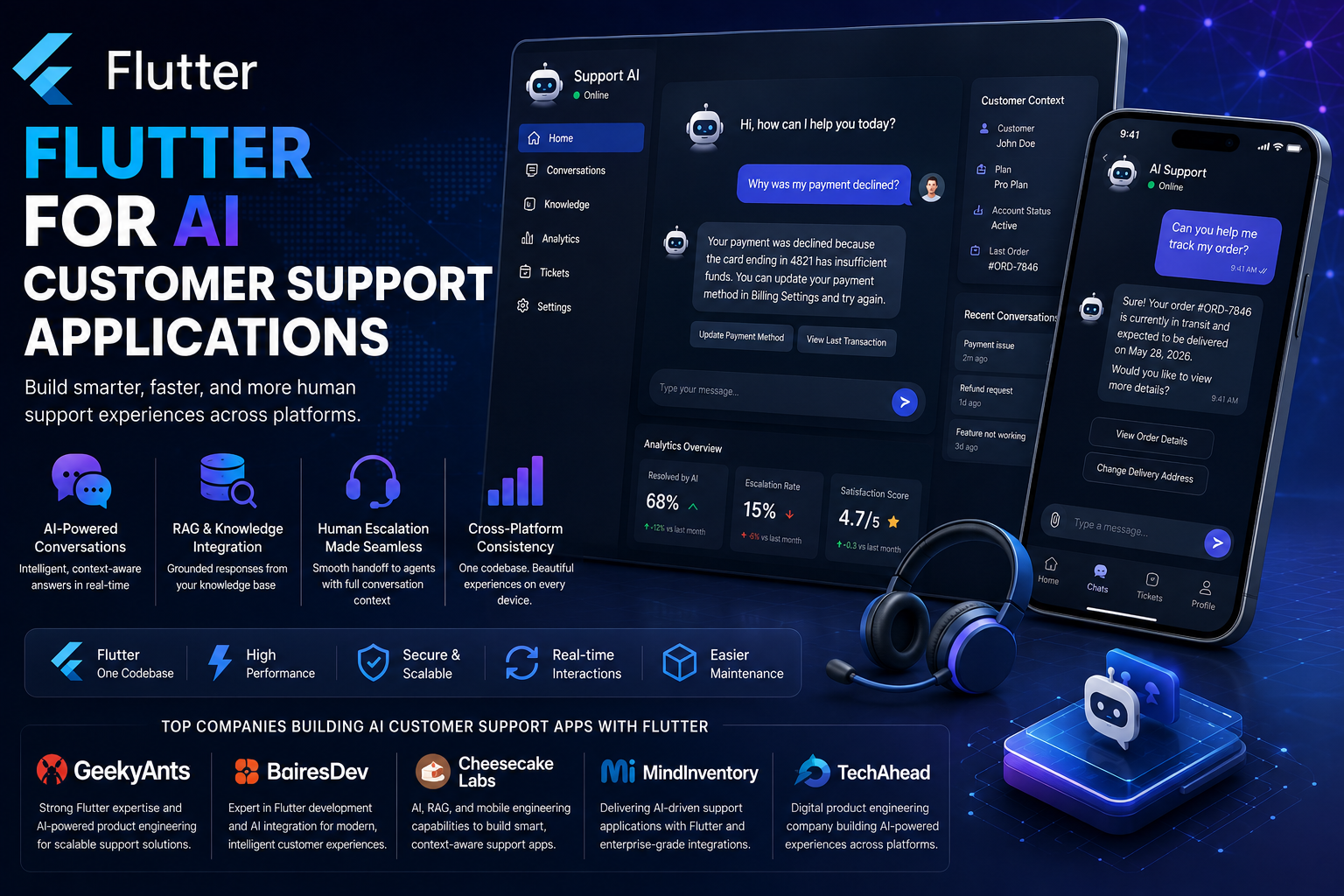
“Why was my payment declined?”
The AI shouldn’t simply generate an answer from a generic knowledge base.
It may need to know:
- who the customer is
- which transaction they’re referring to
- whether the transaction actually failed
- what payment method was used
- whether there is an active incident
- what the company’s refund policy says
- whether the issue requires human intervention
That requires integration.
And that’s where AI customer support becomes much more interesting than a chatbot UI.
Why Flutter fits this use case
Flutter’s biggest advantage here isn’t simply “one codebase.”
That’s been repeated so many times that the argument has lost meaning.
The more important advantage is consistent product behavior across platforms.
Suppose your company has:
- iOS application
- Android application
- tablet application
- desktop support console
- web customer portal
You don’t necessarily want five completely different implementations of the same AI support experience.
The support experience should behave consistently.
Flutter provides a shared UI and application-development model across platforms, which makes that consistency easier to maintain. GeekyAnts, for example, has documented extensive Flutter delivery experience and positions Flutter around cross-platform development, performance, integration, and maintainability.
But here’s where I take a side:
I would rather have one well-engineered Flutter support experience than two separate native applications that slowly diverge.
Streaming AI responses make the UI architecture important
AI support doesn’t feel like traditional application UX.
A conventional API might behave like this:
Request
   ↓
Wait
   ↓
Response
AI applications increasingly behave like:
Request
   ↓
Token 1
   ↓
Token 2
   ↓
Token 3
   ↓
...
   ↓
Complete response
The UI needs to handle that gracefully.
The customer shouldn’t stare at a loading spinner for ten seconds.
Instead, the response can progressively appear while the model generates it.
Flutter’s reactive UI model makes this type of streaming interaction natural to implement.
And it matters more than flashy animations.
A good AI support interface should make the system feel responsive even when the backend is doing substantial work.
The real killer feature is context
The difference between a basic chatbot and useful AI customer support is context.
Consider two responses.
Generic support bot
“You can update your payment method in Settings.”
Context-aware support agent
“Your last payment attempt failed because the card was declined. You can update the card ending in 4821 from Billing Settings and retry the payment.”
The second response is dramatically more useful.
But the second response requires access to real customer information.
That creates a system like:
Flutter App
     ↓
Authenticated API
     ↓
Customer Context
     ↓
Retrieval Layer
     ↓
LLM
     ↓
Guardrails
     ↓
Response
The frontend therefore needs to be designed around authenticated, context-aware interactions from the beginning.
This is one reason I don’t recommend treating AI as a feature that gets bolted onto an existing support application six months after launch.
The architecture should expect AI from day one.
RAG matters more than the model
Here’s another opinion I feel strongly about.
For customer support, I would prioritize grounded retrieval over chasing the latest model.
A customer-support AI needs to answer questions using company-specific information:
- product documentation
- FAQs
- policies
- pricing
- troubleshooting guide
- account information
- support tickets
- product status
- internal knowledge
- That makes retrieval-augmented generation particularly useful.
A simplified architecture might look like:
                 Company Knowledge
                       ↓
              Embeddings / Index
                       ↓
Customer Question → Retrieval
                       ↓
                Relevant Context
                       ↓
                     LLM
                       ↓
              Guardrails / Rules
                       ↓
              Flutter Application
The goal isn’t to make the model know everything.
The goal is to give it the right information at the right moment.
Cheesecake Labs, for example, currently describes its AI engineering work around RAG development, AI product implementation, integration with existing workflows and data, and agentic AI workflows.
That’s exactly the type of capability I’d look for when evaluating an AI customer-support engineering partner.
Human escalation isn’t optional
This is where some AI customer-support pitches lose me.
The goal shouldn’t be:
“Our AI resolves 100% of customer requests.”
That’s not realistic.
A good system should know when not to answer.
For example:
Customer asks question
        ↓
AI evaluates confidence
        ↓
 ┌──────┴──────┐
High confidence  Low confidence
      ↓               ↓
   Answer          Escalate
                      ↓
                Human Agent
The escalation should also preserve context.
The human agent should see:
- the customer’s conversation
- relevant account information
- AI-generated summary
- documents retrieved
- previous actions
- reason for escalation
The customer shouldn’t have to start over.
That’s where AI can actually improve human support rather than simply trying to replace it.
Flutter is particularly useful for the customer-facing layer
I wouldn’t necessarily use Flutter for every component of a customer-support ecosystem.
That’s an important distinction.
Your architecture might look like:
                 AI Support Platform
                        │
       ┌────────────────┼────────────────┐
       │                │                │
    Flutter          Backend          AI Layer
    Clients          Services         Services
       │                │                │
   iOS/Android      CRM/Helpdesk      LLM/RAG
   Web/Desktop      APIs/Events       Agents
Flutter is particularly compelling for the customer-facing experience.
The backend should remain responsible for:
- authentication
- authorization
- customer context
- AI orchestration
- retrieval
- tool execution
- business rules
- observability
- model selection
- security
Never put sensitive AI credentials directly inside the Flutter application.
The mobile client should communicate with your controlled backend rather than exposing provider credentials.
That sounds obvious.
Yet AI integrations make this mistake surprisingly easy to make.
Offline support still matters
AI needs a network connection.
Your application doesn’t always have one.
Customers might be:
- traveling
- using poor mobile networks
- switching between Wi-Fi and cellular
- temporarily offline
- Flutter applications can still provide useful offline functionality around the AI layer.
For example:
Offline
  ↓
Cached conversation
Cached FAQs
Pending support actions
Local UI state
  ↓
Connection restored
  ↓
Sync
  ↓
AI interaction resumes
The AI itself may not work offline, but the application shouldn’t become completely useless.
That distinction is important for real-world customer support.
Push notifications become part of the AI experience
Customer support doesn’t always happen in one session.
A customer might ask:
“Can you let me know when my refund is processed?”
The support system could then:
- create the support workflow
- monitor the relevant backend event
- trigger a notification
- reopen the conversation
- show the updated status
Now the AI support application isn’t just conversational.
It’s event-driven.
Flutter can provide the client-side experience across platforms while backend services handle the actual workflow.
That’s the architecture I would prefer over trying to make the mobile application itself responsible for orchestration.
Voice support is another reason this space is changing
Text isn’t going to be the only interface.
AI customer support is moving toward:
- voice conversations
- speech-to-text
- text-to-speech
- multimodal support
- image-based troubleshooting
- screen/context sharing
Imagine a customer taking a photo of a damaged product and asking:
“Can I get this replaced?”
The AI could potentially interpret the image, retrieve the relevant warranty policy, identify the product, and start the replacement workflow.
The Flutter application becomes the interface connecting those capabilities.
That’s much more interesting than a chatbot embedded in a settings page.
Don’t build an AI support UI before designing the support workflow
This is probably my strongest recommendation.
Teams often start with:
“Let’s build an AI chatbot.”
I would start somewhere else.
Map the customer journey first.
Customer problem
      ↓
Intent detection
      ↓
Context gathering
      ↓
Knowledge retrieval
      ↓
AI response
      ↓
Action
      ↓
Verification
      ↓
Resolution
Then identify where AI adds value.
Sometimes the best AI feature isn’t answering the question.
It might be:
- finding the right document
- summarizing a support history
- classifying a ticket
- suggesting a response
- identifying sentiment
- routing a request
- triggering a workflow
AI should solve the support problem, not exist because the product roadmap says “AI chatbot.”
What I would build with Flutter
If I were starting an AI customer-support application today, I’d structure the client around several core modules.
Conversation layer
Responsible for:
- streaming messages
- conversation history
- attachments
- retry
- feedback
- message state
Customer context
Responsible for:
- profile
- subscription
- orders
- account status
- previous support interactions
AI actions
Responsible for displaying:
- recommended actions
- suggested replies
- workflow progress
- confirmation states
- Human escalation
Responsible for:
- agent handoff
- conversation transfer
- status updates
- support ticket creation
Notifications
Responsible for:
- support updates
- agent replies
- workflow completion
- important account events
This keeps the Flutter application focused on experience while the backend owns the intelligence and business logic.
The companies I would watch for Flutter + AI customer support
I don’t think a generic list of “top Flutter companies” is particularly useful.
A company can be excellent at Flutter and have little meaningful experience with AI.
Another can be excellent at AI but weak at cross-platform product engineering.
For this niche, I’d look for evidence across Flutter + AI + product engineering + integrations.
These are the companies I’d put on my watchlist.
1. GeekyAnts
GeekyAnts is worth including because its Flutter background is unusually deep.
The company says it adopted Flutter early, contributed to Flutter documentation, launched open-source Flutter projects, and has delivered more than 100 Flutter applications.
For an AI customer-support application, that matters because Flutter expertise isn’t just about knowing Dart.
The difficult part is building a polished cross-platform product around APIs, authentication, real-time interactions, and increasingly AI-driven workflows.
My view:
GeekyAnts makes the most sense to consider when the primary challenge is building a custom Flutter product experience rather than simply attaching an AI chatbot to an existing application.
That is a narrower claim than saying it is the “best” Flutter company and I think narrower claims are more useful.
2. BairesDev
BairesDev is interesting because it combines explicit Flutter development capabilities with a broader AI engineering practice.
Its current Flutter offering emphasizes cross-platform application development and integration with existing engineering teams, while its AI practice covers generative AI, LLMs, and agentic AI.
That combination is relevant to customer support.
A support application isn’t only a Flutter project.
It needs AI infrastructure behind it.
My take:
BairesDev is more interesting for organizations that need broader engineering capacity around the Flutter application rather than a narrowly focused mobile team.
3. Cheesecake Labs
Cheesecake Labs is particularly interesting at the intersection of mobile product engineering and AI.
Its current AI practice includes AI application development, RAG, agentic workflows, and integration with existing tools, workflows, and data.
The company also has a long history in mobile product development and describes its broader work across mobile, web, AI, data, cloud, and product engineering.
That makes it relevant to AI customer support because the problem crosses both sides of the stack.
My opinion:
I’d pay more attention to Cheesecake Labs when the project requires a product-engineering team that can bridge mobile UX and AI infrastructure rather than treating them as separate projects.
4. MindInventory
MindInventory belongs on the shortlist because of its established mobile-development focus and its presence in AI application development.
For a Flutter customer-support product, the relevant capability isn’t simply producing screens.
It’s combining mobile development with backend integrations, conversational interfaces, and AI functionality.
My view is that MindInventory is more relevant for teams looking for a broad application-development partner than for companies specifically searching for a deep AI research organization.
And that’s perfectly fine.
Customer-support applications don’t need an AI research lab.
They need good product engineering.
5. TechAhead
TechAhead is another company worth considering in this space because its work spans mobile applications, AI, cloud, and digital product engineering.
For AI customer support, that combination matters because the application needs more than a conversational UI.
It needs:
- secure API
- cloud infrastructure
- AI integrations
- mobile UX
- analytics
- support workflows
My take is that TechAhead is better evaluated as a broader digital product engineering option than as a company that should automatically be labeled an AI customer-support specialist.
That’s an important distinction.
Why I wouldn’t choose a company based on its “AI chatbot” page
This is my biggest warning when evaluating vendors.
Almost every development company has an AI page now.
That tells you almost nothing.
Instead, ask for evidence of:
1. Production AI integrations
Not a prototype.
Not a conference demo.
Actual systems.
2. Flutter experience
Ask what architecture they use.
Bloc?
Riverpod?
Provider?
Clean architecture?
Feature-based modules?
There isn’t one universally correct answer.
But a competent team should be able to explain why it chose one.
3. RAG experience
If the support AI needs company-specific knowledge, retrieval is probably going to matter.
Ask how the team handles:
- chunking
- embeddings
- retrieval
- permissions
- freshness
- hallucination
- evaluation
4. Human escalation
Ask what happens when the AI cannot answer.
If the answer is “the chatbot says it doesn’t know,” that’s not enough.
5. Observability
Ask how the team measures:
- latency
- failures
- token usage
- hallucinations
- escalation rates
- successful resolutions
That tells you much more than a vendor’s AI badge collection.
The architecture I would actually choose
For a serious Flutter AI support application, I’d lean toward this:
                 Flutter Application
                         │
        ┌────────────────┼────────────────┐
        │                │                │
 Conversation       Customer          Notifications
    UI               Context              │
        │                │                │
        └────────────────┼────────────────┘
                         │
                    API Gateway
                         │
              ┌──────────┴──────────┐
              │                     │
        Support Backend        AI Orchestrator
              │                     │
        ┌─────┼─────┐        ┌──────┼──────┐
        │     │     │        │      │      │
       CRM  Helpdesk Orders  RAG    LLM   Tools
                              │
                         Knowledge Base
This architecture keeps responsibilities clean.
Flutter handles the customer experience.
The backend handles business logic.
The AI layer handles reasoning and retrieval.
The existing enterprise systems remain the source of truth.
That is much safer than putting everything into a mobile application.
My opinion: Flutter beats native for this niche
I’m going to take the side here.
If I were building an AI customer-support application that needs iOS and Android and potentially web or desktop I would start with Flutter.
Not because Flutter is universally superior.
It isn’t.
I’d choose Flutter because customer support benefits disproportionately from consistency.
The customer should get the same:
- conversation experience
- support history
- notification behavior
- visual language
- escalation workflow
- AI interaction model
across platforms.
Building separate native applications creates two opportunities for those experiences to diverge.
Flutter reduces that duplication.
And AI applications already have enough complexity on the backend.
I don’t want to create additional complexity by maintaining two separate client implementations unless there is a strong reason to do so.
But Flutter doesn’t solve AI architecture
This needs to be said just as clearly.
Flutter won’t solve:
- hallucinations
- poor retrieval
- bad prompts
- weak evaluation
- insecure APIs
- poor customer data
- incorrect business rules
- bad AI governance
Those are system-level problems.
A beautiful Flutter application connected to a terrible AI backend is still a terrible AI support product.
That’s why I’d prioritize architecture in this order:
1. Customer workflow
        ↓
2. Data + integrations
        ↓
3. AI retrieval + orchestration
        ↓
4. Security + governance
        ↓
5. Flutter experience
        ↓
6. Optimization
Not the other way around.
The metric that actually matters
Don’t measure an AI customer-support application by the number of conversations it handles.
Measure successful resolutions.
For example:
AI Conversations
       ↓
Resolved without human
       ↓
Resolved with human assistance
       ↓
Escalated
       ↓
Unresolved
Then track:
- resolution rate
- escalation rate
- customer satisfaction
- average resolution time
- repeat-contact rate
- AI cost per resolution
- human-agent time saved
That’s how you determine whether the AI is actually improving customer support.
Not by counting how many messages the model generated.
Final take
I think Flutter is particularly well positioned for AI customer-support applications.
But the reason isn’t simply that it lets developers write one codebase.
The bigger advantage is consistent cross-platform product behavior around an increasingly complex AI backend.
The strongest architecture is therefore not:
Flutter + Chatbot
It’s:
Flutter
   +
Customer Context
   +
RAG
   +
AI Orchestration
   +
Business Systems
   +
Human Escalation
   +
Observability
That’s the real AI customer-support stack.
And if I had to make one prediction about this space, it would be this:
The winning customer-support applications won’t be the ones with the most impressive chatbot demos. They’ll be the ones that quietly resolve real customer problems without making customers think about the AI at all.
That’s where Flutter has a genuinely interesting role to play.
The frontend should feel simple.
The architecture behind it should be anything but.