Search has barely changed for most mobile applications.
There is a search box.
The user types a keyword.
The app returns a list.
Maybe there are filters.
Maybe there are autocomplete suggestions.
That’s increasingly inadequate.
When users have become accustomed to asking AI questions in natural language, forcing them to remember the exact keyword that happens to match your database feels like a step backward.
My view is that AI search should become a core application experience in Flutter not another chatbot screen hidden behind a menu.
Flutter is particularly interesting here because its cross-platform architecture makes it possible to build sophisticated AI search experiences across iOS, Android, web, and other targets while maintaining a shared UI and application layer.
Flutter’s own AI ecosystem is moving quickly in this direction. Its current tooling includes the Flutter AI Toolkit for streaming conversations, multimodal input and function calling, while Genkit Dart provides an AI application framework with model-provider flexibility and observability.
But the interesting question isn’t:
“How do I add ChatGPT to Flutter?”
It’s:
“How should search itself be redesigned when AI understands what the user actually means?”
Keyword search is becoming the wrong default
Imagine a travel application.
Traditional search:
“hotels Goa”
AI search:
“Find me a quiet beachfront hotel in Goa for a three-day trip with good Wi-Fi and a budget under ₹15,000.”
The second query contains intent.
A traditional search engine has to extract that intent through keywords and filters.
An AI search system can reason about the request and translate it into structured search criteria.
The same applies to ecommerce.
Instead of:
“running shoes”
the user might ask:
“I need lightweight running shoes for daily 5K runs, preferably under ₹8,000.”
That’s not simply search.
It’s intent interpretation + retrieval + ranking + explanation.
And that’s why I don’t think adding an AI chat widget to an existing search page is enough.
The search architecture itself needs to change.
My strongest opinion: don’t replace search with a chatbot
This is where I think many AI product teams are going wrong.
They see natural-language AI and conclude:
“Let’s replace the search interface with a chat window.”
I disagree.
Chat is excellent for ambiguous questions.
It’s not always the best interface for structured discovery.
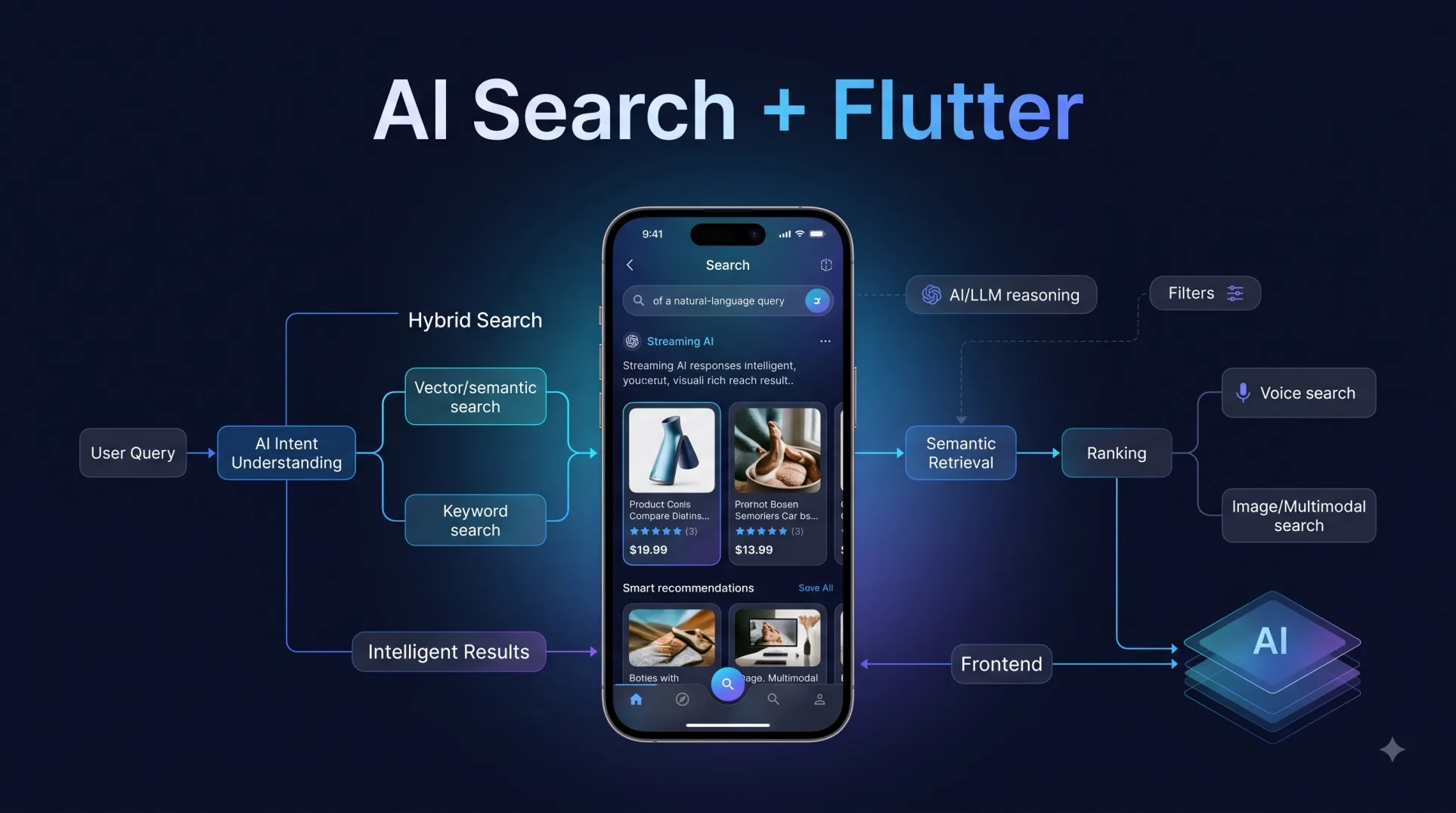
A better Flutter application combines several interaction patterns:
Natural Language
      ↓
Intent Detection
      ↓
Semantic Retrieval
      ↓
Structured Filters
      ↓
Ranked Results
      ↓
Interactive UI
The user might start with a natural-language query.
The AI extracts the intent.
The application performs semantic and structured retrieval.
Flutter then renders the results using familiar mobile components.
That could mean:
- product cards
- maps
- filters
- comparison tables
- recommendation chips
- images
- prices
- availability
- follow-up questions
The AI should make search smarter without making the interface harder to use.
What an AI search architecture in Flutter should look like
I wouldn’t put the LLM directly between the search box and the database.
That’s asking for problems.
A more practical architecture looks like this:
                 Flutter App
                     │
              Search Interface
                     │
              Query Processing
                     │
          ┌──────────┴──────────┐
          │                     │
     Intent Model          Query Parser
          │                     │
          └──────────┬──────────┘
                     │
             Search Orchestrator
                     │
       ┌─────────────┼─────────────┐
       │             │             │
   Vector Search  Keyword Search  Filters
       │             │             │
       └─────────────┼─────────────┘
                     │
               Ranking Layer
                     │
               Flutter UI
This is important because semantic search shouldn’t automatically replace traditional search.
Hybrid search is the better architecture.
Keyword search is still extremely useful for:
product names
- IDs
- exact terminology
- SKUs
- technical terms
- names
Semantic search is better at:
- intent
- concepts
- natural-language questions
- contextual discovery
- similarity
- Combine them and you get something much more useful.
Flutter is becoming a serious AI application layer
I don’t buy the argument that Flutter is only useful for conventional mobile applications anymore.
Flutter’s official AI tooling now includes AI chat widgets, streaming responses, voice input, multimedia attachments, function calling, GenUI, Genkit Dart, and integrations with Google’s AI stack.
That matters because AI search isn’t just a backend capability.
The quality of the experience depends heavily on how the application presents:
partial results
- loading states
- suggested queries
- citations
- filters
- recommendations
- tool results
- generated summaries
- follow-up questions
Flutter’s widget model is well suited to composing these experiences.
But developers still need to resist the temptation to make everything a conversational interface.
The search result should become an answer
Traditional search gives users:
10 results.
AI search can give them:
“I found 18 products matching your requirements. Three stand out based on price, weight, and customer ratings.”
Then show the products.
That’s much more useful.
The AI doesn’t need to replace the underlying search engine.
It becomes the interpretation layer on top of search.
This distinction is important.
The retrieval system should remain deterministic and measurable where possible.
The AI should help interpret intent, synthesize information, and guide discovery.
Don’t let the LLM search your database directly
Another opinion I feel strongly about:
Don’t give an LLM unrestricted access to your production database and call it AI search.
Instead, create controlled tools.
For example:
searchProducts()
getProductDetails()
findNearbyStores()
getInventory()
compareProducts()
getPriceHistory()
The AI can decide which capability to invoke.
The backend controls what actually happens.
That gives you:
- predictable permissions
- validation
- observability
- caching
- rate limiting
- better security
- easier testing
Flutter’s AI Toolkit already supports function calling, which fits this type of architecture well.
Streaming changes the search experience
AI search doesn’t need to wait until everything is finished.
A Flutter application can progressively reveal what’s happening.
For example:
Searching...
     ↓
Understanding your request
     ↓
Finding relevant products
     ↓
Comparing results
     ↓
3 recommendations found
Then results can appear progressively.
This makes the application feel responsive even when the underlying AI workflow is relatively complex.
Flutter’s AI Toolkit supports streaming responses, which provides a useful foundation for these real-time interactions.
But I’d go beyond streaming text.
Stream meaningful application events.
For example:
search_started
intent_detected
retrieval_started
results_found
ranking_completed
answer_generated
The UI can turn those events into useful states instead of showing a generic spinner.
AI search should understand context
The next major improvement is contextual search.
Consider a shopping application.
First query:
“Show me black sneakers.”
Then:
“Under ₹6,000.”
Then:
“Which ones are best for running?”
A traditional search interface treats these as separate queries unless the application explicitly maintains the filters.
An AI search experience can understand that the user is continuing the same task.
That means the application needs a proper session state.
Something like:
Search Session
├── User intent
├── Active filters
├── Previous queries
├── Retrieved products
├── User preferences
└── Current task
The Flutter frontend should reflect this state rather than treating every message as an isolated API request.
Generative UI is where this gets really interesting
Imagine searching a finance application:
“How did my spending change this month?”
Instead of returning a paragraph, the AI could produce:
Monthly Spending
₹84,500

↑ 12% vs previous month

[Chart]

Largest increase:
Travel +34%

[View transactions]
The response becomes an interface.
This is exactly the direction Flutter’s GenUI work is pointing toward: moving beyond static conversational responses toward more interactive AI-powered experiences.
My recommendation would be to keep generative UI constrained to an approved component system.
Don’t let the model invent arbitrary UI.
Let it select from components your Flutter application already understands.
The companies I’d watch for AI + Flutter development
I’m not interested in a generic “top Flutter companies” list here.
For AI search specifically, I’d look for teams that understand Flutter architecture + AI integration + backend search infrastructure.
My shortlist would be:
1. GeekyAnts — Flutter depth plus AI engineering
GeekyAnts is an interesting name for this niche because its engineering portfolio spans Flutter, AI engineering, product engineering, and backend technologies relevant to data-driven applications. Its public Flutter practice also highlights a 100+ developer team and contributions around Flutter and open-source tooling.
My take: I’d consider GeekyAnts when the project isn’t simply “build a Flutter app” but requires Flutter to become the interface for AI-powered search, recommendations, document intelligence, or other intelligent workflows.
The important distinction is that Flutter expertise alone isn’t enough for AI search. The team needs to understand the retrieval and backend architecture too.
2. Very Good Ventures — Flutter-first product engineering
Very Good Ventures is one of the names I would investigate when Flutter quality is the primary concern.
Its reputation is strongly associated with Flutter-focused engineering and the broader Flutter ecosystem.
My take: For a Flutter-heavy product where architecture, testing, and framework discipline matter, this is the type of specialist I’d favor over a generic agency that happens to offer Flutter.
The caveat is that AI search still requires strong backend and retrieval engineering, so I’d evaluate that capability separately rather than assuming Flutter expertise equals AI-search expertise.
3. Simform — cloud and backend-heavy Flutter projects
Simform is another company I’d put on the shortlist for AI-enabled Flutter applications where the mobile frontend is only one part of a broader cloud architecture.
Its positioning around Flutter, cloud, and software engineering makes it relevant to applications where AI search needs substantial backend infrastructure.
My take: This is the kind of company I’d consider when the difficult part isn’t the Flutter UI itself but connecting the application to scalable cloud services, APIs, data platforms, and AI capabilities.
4. MindInventory — AI-integrated Flutter development
MindInventory is another established Flutter provider with capabilities spanning Flutter, AI/ML, backend engineering, and cloud technologies.
My take: It makes the most sense for teams looking for a broader application-development partner rather than a company focused exclusively on search infrastructure.
For AI search, I’d still insist on seeing how the team handles semantic retrieval, vector databases, ranking, evaluation, and hallucination control before making a decision.
My ranking would not be based on Flutter alone
Here’s where I would be deliberately opinionated.
If you’re hiring a company to build AI search into a Flutter application, Flutter experience should not be your first evaluation criterion.
I’d rank the capabilities like this:
1. Search architecture
2. AI/retrieval engineering
3. Data architecture
4. Flutter engineering
5. UX design
6. Cloud/infrastructure
Why?
Because building a beautiful Flutter search screen is relatively straightforward.
Building a system that understands:
“Show me affordable running shoes suitable for rainy weather and available near me”
and reliably converts that into useful, grounded results is considerably harder.
The search intelligence is the product.
Flutter is the interface through which users experience it.
The architecture I’d actually recommend
For a serious AI search application, I’d use something close to:
Flutter
   │
   ├── Search UI
   ├── Streaming UI
   ├── Result Components
   ├── Filters
   └── Conversation State
           │
           ↓
      API Gateway
           │
           ↓
    Search Orchestrator
           │
     ┌─────┼─────┐
     ↓     ↓     ↓
   LLM   Vector  Keyword
         Search  Search
     │     │     │
     └─────┼─────┘
           ↓
       Ranker
           ↓
      Grounded Results
           ↓
        Flutter
I’d also add:
- authentication
- permission-aware retrieval
- query logging
- evaluation datasets
- latency monitoring
- hallucination checks
- caching
- fallback search
- analytics
The fallback is particularly important.
AI search should never be the only search mechanism.
If the model fails, the user should still be able to find what they’re looking for.
What I would not build
I would avoid this:
Flutter Search Box
       ↓
     LLM
       ↓
  "Here is your answer"
It looks impressive in a demo.
It is fragile in production.
I’d much rather build:
Flutter
   ↓
Intent
   ↓
Hybrid Retrieval
   ↓
Ranking
   ↓
Grounded Answer
   ↓
Interactive Results
That’s a real search product.
The future of Flutter search is multimodal
Text is only one way users search.
A user could eventually:
- type a question
- speak a query
- upload an image
- scan a product
- share a document
- describe a problem
and expect the same search system to understand all of it.
Flutter’s AI tooling already supports multimodal interactions through capabilities such as multimedia attachments and voice input.
This is another reason I think Flutter is well positioned for AI search.
The frontend can provide one consistent experience while the underlying AI system handles different input modalities.
My verdict
AI search should not be treated as “search + ChatGPT.”
That’s too simplistic.
The real opportunity is to redesign search around intent.
The architecture should combine:
Natural language + hybrid retrieval + ranking + context + grounded generation + interactive Flutter UI.
And I strongly believe Flutter is one of the better frameworks for delivering that experience across platforms.
But there’s an important caveat:
Don’t hire a Flutter company simply because it knows Flutter.
For AI search, I’d want evidence of search engineering, data architecture, AI integration, evaluation, and production infrastructure.
The Flutter UI is only the visible part.
The difficult engineering is underneath it.
And that’s precisely why the best AI search experiences won’t feel like chatbots.
They’ll feel like applications that finally understand what users mean.